The Hive: user guide
The Hive is a small team of Claude agents that runs on your own computer. You say what you want in a chat, in your own words. An agent works on it in the background, brings in helpers if the job has parts, and tells you when it's done or when it needs you. It keeps working when the page is closed.
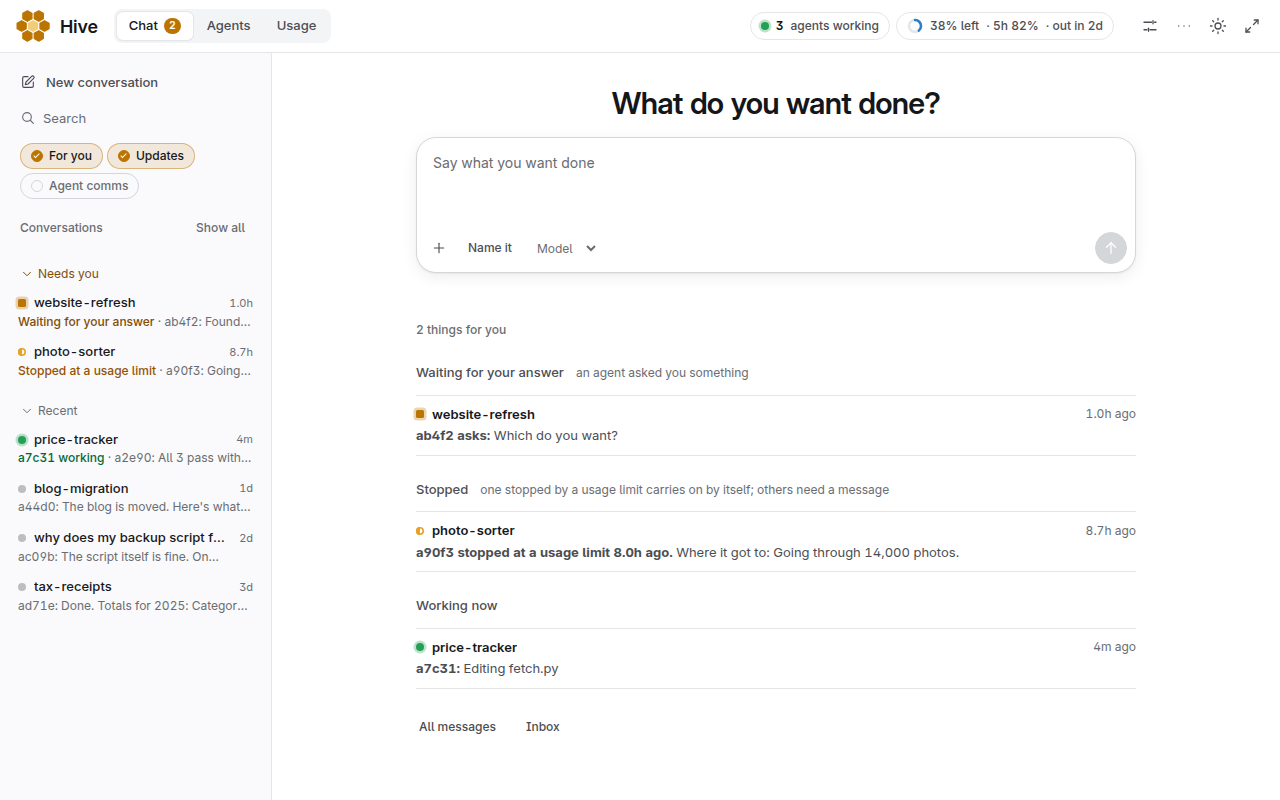
All screenshots use a made-up Hive.
Before you install
Three things are worth knowing first.
- Agents run in a sandbox. Inside it, around the Hive's folder, they work without asking. A step outside it needs an approval. It has limits: agents can read the Claude sign-in they run on and use the internet, so anything they can read they can send.
- It uses your Claude limits by itself. Every agent is a Claude session, and agents can start other agents. There is no limit on how many run at once until you set Agents at once in Settings. On a subscription, the Hive stops starting new agents at 95% of your weekly limit. With an API key it can't see your spending and won't stop, so set a limit in the Anthropic Console.
- One Hive is one group of people who trust each other. Anyone who can use a Hive has its full rights, including its Claude sign-in. Give each person or group their own.
Power in Settings sets who approves a step outside the sandbox: you, a warden (an agent whose only job is judging these steps), or a warden that tells you afterwards. At every level, these stay your call: spending money, credentials, opening this machine to the network, anything sent off this machine with your accounts or keys (git push, gh, publishing, mail, posting), publishing private details, and deleting repos, commits or history.
What you need
- Linux with systemd (a laptop or a server, with or without sudo), or Windows 10 or 11. macOS has a test build that hasn't run on a real Mac yet. You can also run the Hive on a Linux server or virtual machine and open it from your Mac.
- A Claude subscription, or an Anthropic API key.
- Enough disk for your projects. The Hive itself is small, but some extras need gigabytes of tools.
Install
Linux:
curl -fsSL https://hivelab.ca/install.sh | shIt asks for your password once, makes a user called hive, installs git, Python and Claude Code if they're missing, and prints an address.
Linux, in your own account, without sudo:
curl -fsSL https://hivelab.ca/install.sh | sh -s -- --this-accountIt puts everything in ~/hive (HIVE_DIR=/path picks another folder) and runs as you. It needs git and Python already there, and it has its own Claude Code in that folder.
Agents still run in a sandbox, around that folder. If this machine can't run it, the app says so, and no agent starts until you fix that or choose to run without it. Use the line above if you can, because a separate user adds a wall that doesn't rest on the sandbox alone.
Agents stop while the machine sleeps and carry on when it wakes. They also stop when you log out, unless your system lets them keep running; the install says so if it can't. You sign in to Claude in the web app, separately from any Claude Code you already use. If it's the same Claude account, it's the same usage.
Windows, in PowerShell:
irm https://hivelab.ca/install.ps1 | iexIf WSL 2 is missing it installs it, which needs your approval and a restart; then run the line again. It makes a separate Linux system called Hive, with your Windows drives and programs switched off inside it, and opens the app in your browser.
If the install stops partway, it says which step and why, shows the end of its log and where the whole log is (~/.hive-install.log). Fix what it names (often the network, a missing package or a full disk: it needs about 1.5 GB free) and run the same line again. It carries on from where it stopped, and a download that fails is tried three times first. It also asks whether to send that failure to the Hive's makers so they can fix it. Nothing goes unless you type y, and what goes is the step, the error and the end of the log, with your name, home folder, addresses and keys taken out. HIVE_REPORT=1 before sh sends it where nothing can ask, and HIVE_REPORT=0 stops the question. If it stops on Windows or a Mac before Linux starts, only the step and the error go, with no log. A coding agent such as Claude Code or Codex can run the install and read the log for you: the main page has a prompt to paste into it.
To open it again, click the Hive icon. The install puts one in the Windows Start menu and on the Desktop, in ~/Applications on a Mac, and in the app menu on Linux. It starts the Hive if it was stopped, waits for it, then opens the app. In the browser you can install the page as an app (Chrome and Edge: the install button in the address bar; Safari: Share, then Add to Dock; iPhone: Share, then Add to Home Screen). Uninstalling removes the icon.
The address is the key to your Hive. Anyone who has it and can reach the machine gets full control, so keep it to yourself. To see it again:
| Where | Command |
|---|---|
| Linux | sudo -iu hive hive web |
| Linux, in your own account | hive web |
| Windows | hive web in a new PowerShell window |
On a server, forward the port from your own computer, then open the address there: ssh -L PORT:127.0.0.1:PORT server. A new server can install itself: see On a small server.
Words you'll see
- Agent: one Claude session working for you, with a short code for a name like
a7c31. Each has its own memory of its work. - Conversation: one job. You and any agents on it talk there. Each message starts or wakes an agent, so one conversation per job keeps things clear.
- Quiet: an agent has nothing running right now. Quiet isn't broken. A message wakes it with what it knows intact. If a conversation has grown very long, a new agent may take over and read it first.
- Your limits: what your Claude plan allows per week and per 5 hours. The Hive shares these with anything else you use that account for.
- Extras (modules): optional tools agents can use, such as circuit board design.
The app
When setup is finished, the app offers a short guided tour. It says what to click, highlights it and waits for you. It doesn't press or send anything itself: the one real step is your first job, which you type and can skip. You can leave at any time, and Take the tour under More starts it again.
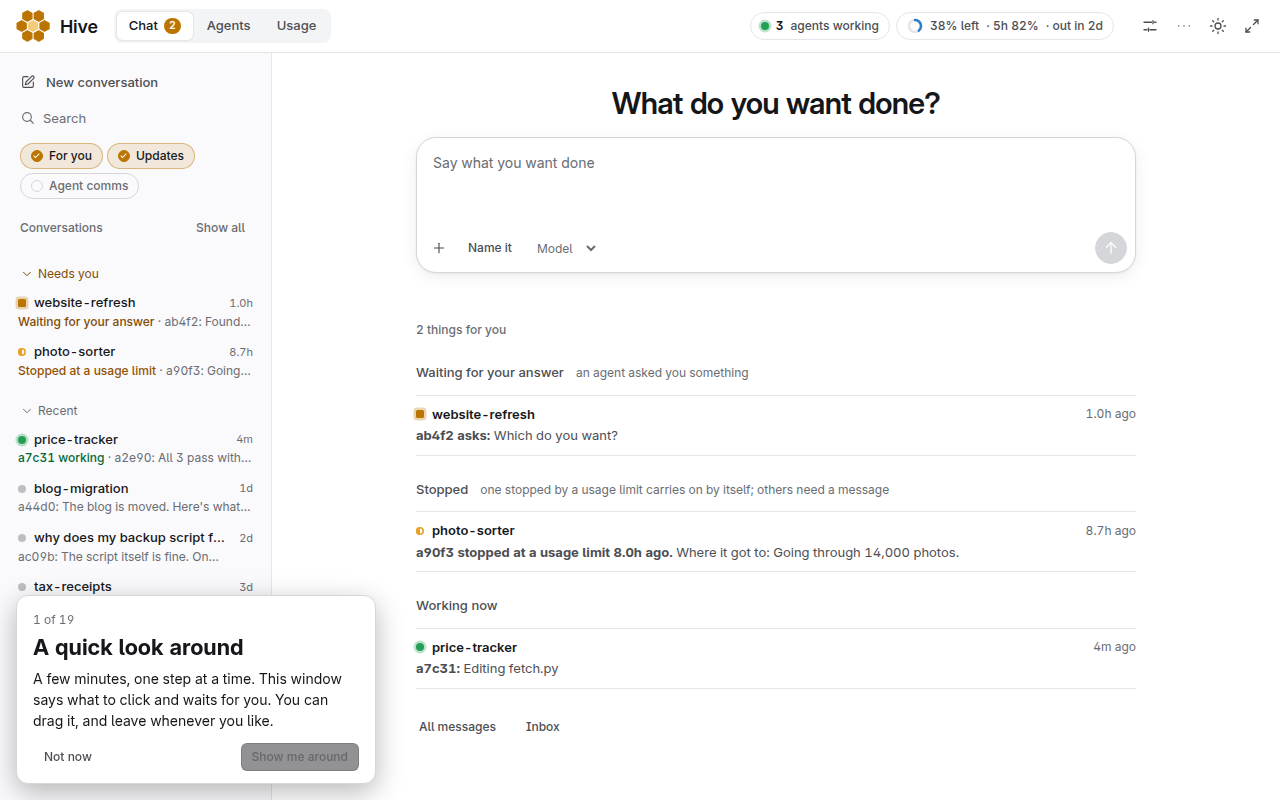
The top bar has Chat, Knowledge, Agents (called Now on the page) and Usage, with Settings as the sliders icon at the right and a More menu. On a phone the tabs are in a bar at the bottom. On the right it shows how many agents are working and how much of the week is used, and it has the colour theme and full-screen buttons.
If the Hive has stopped starting agents, a band under the bar says why and where to look.
Chat
Chat is where you'll spend your time. The left side lists your conversations. Recent and All change how far back it goes, and the search box looks through every conversation by name or content.
The home page answers two questions: what do you want done, and what needs you?
- Waiting for your answer: an agent asked you something.
- New for you: answers you haven't opened.
- Stopped: an agent hit a usage limit or an error, or looks stuck. One stopped by a limit usually resumes by itself after the reset. Otherwise a message gets it going.
- Working now: what's under way.
To start a job, type in the box and press Start or Enter. Shift+Enter makes a new line. Name it gives the conversation a name; otherwise it's named for you. Attach adds files. If the voice module is installed and working, a microphone button records a voice memo: press it to start and press again to send (or hold it while you talk and let go), × or Esc throws the recording away. It is transcribed and summarized on the machine and answered in the conversation.
If the phone module is running, a phone button next to it, and another in the top bar on every page, starts a voice call: with the Hive on a new conversation, or with a new agent that reads the conversation you're in. To call a particular agent, rest the pointer on its name or round icon: a small card offers Call (that agent pauses its work and picks up; if it hasn't in a minute, a copy that knows its work answers) and DM (opens its conversation with your message addressed to it). On a phone, the same two buttons are at the top of the agent's page. Just talk; it answers out loud, and you can cut in while it speaks. Ask "put me through to whoever's working on X" and you go on hold (with music) while that agent picks up. When an agent needs you it can ring: a banner with Answer and Decline shows on the page. Mute and Hang up are on the call card, and the transcript is posted to the conversation afterwards.
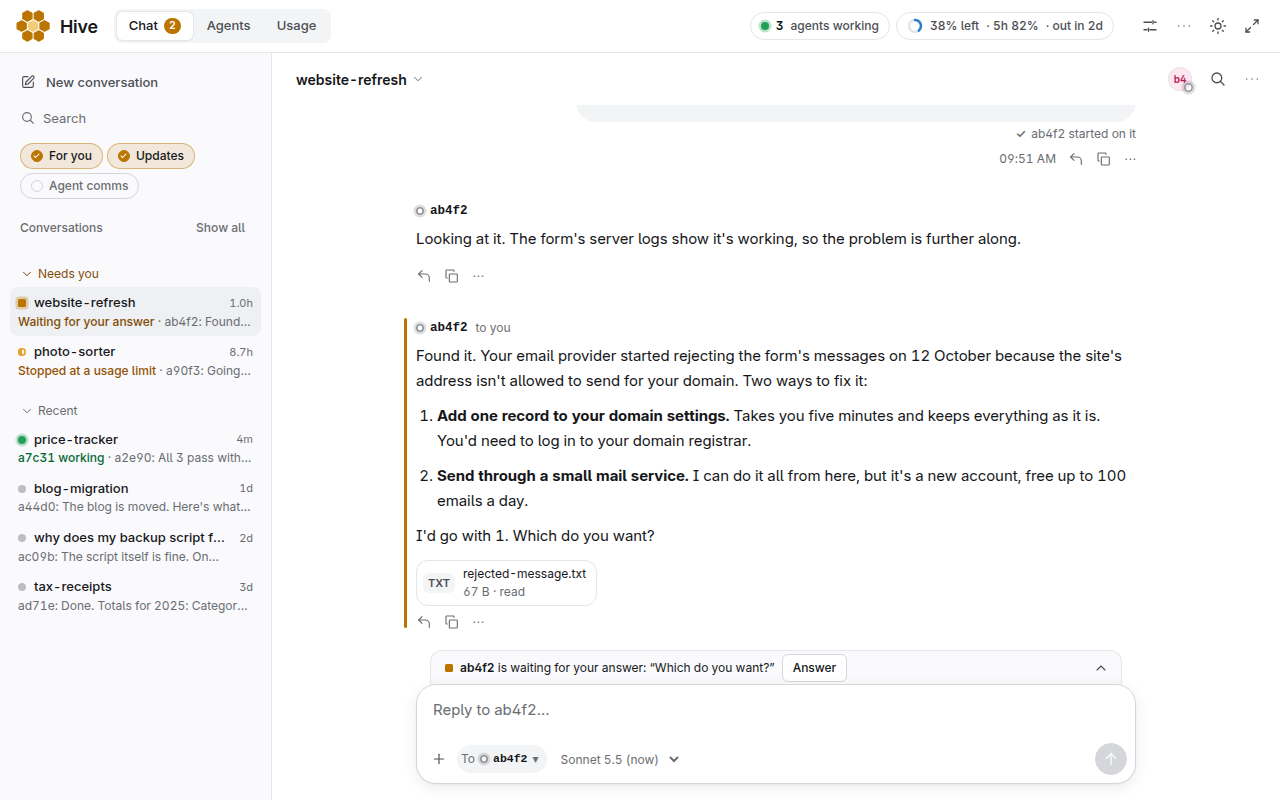
In a conversation:
- Just typing sends your message to the agent you've been talking to. If it's busy, it sees your message after its current step. If it's quiet, the message wakes it. Your message shows who has it underneath, such as "Seen by a7c31".
- Reply on a message answers that message and goes to whoever wrote it.
- To in the message box picks who gets it. You can also type
@and a name. - Answer appears above the box when an agent is waiting for you.
- Carry on appears when an agent stopped at a usage limit and there's room again.
- The line above the box says what's happening right now. Stop… there ends an agent (see below).
- More at the top right has the conversation's priority, search and a link to its place on the Timeline.
- Share this result (in More) turns the conversation into one web page you can post: your ask, who worked on it and how long it took, the result with its pictures, and a replay. First you see every message with a Remove button on each, and a plain line that everything on the page becomes public if you post it. Paths, links, emails, addresses and long tool output are already taken out, so read it anyway. The page is saved to your downloads as one file that works offline; nothing is uploaded. In a terminal,
hive share CONVERSATIONdoes the same, and--showprints the text first.
Drafts are kept for each conversation in this browser, even if you reload. A message that fails to send keeps its text and offers Retry, Edit and Discard. Sent messages can't be unsent.
Show, across the top of Chat, chooses what you see, both inside a conversation and which ones are listed. Each choice turns on and off by itself, so you can have any mix. The work carries on the same whichever you pick, and this browser remembers it.
- For you: your messages, what agents ask or tell you, and the result of each job. The rest runs in the background.
- Updates: the agents' progress reports.
- Agent comms: agents talking to each other and the Hive's own notes.
Show N hidden at the top of a conversation turns all three on. Search always looks through everything. All messages, at the bottom left, is every conversation in one list.
Knowledge
What the Hive keeps: notes, projects and the files attached to posts, to browse, search and read. Keys and passwords are blanked out of what it shows. It only reads, apart from a project's plan, which you can edit here and hand to an agent with Save and start an agent.
Ask the Hive is a box above the page: type what you're looking for ("find me the files about X") and an agent starts on its own conversation, searches the knowledge base and answers right there. Each file it names is a link that opens in Knowledge. New question starts another.
Agents
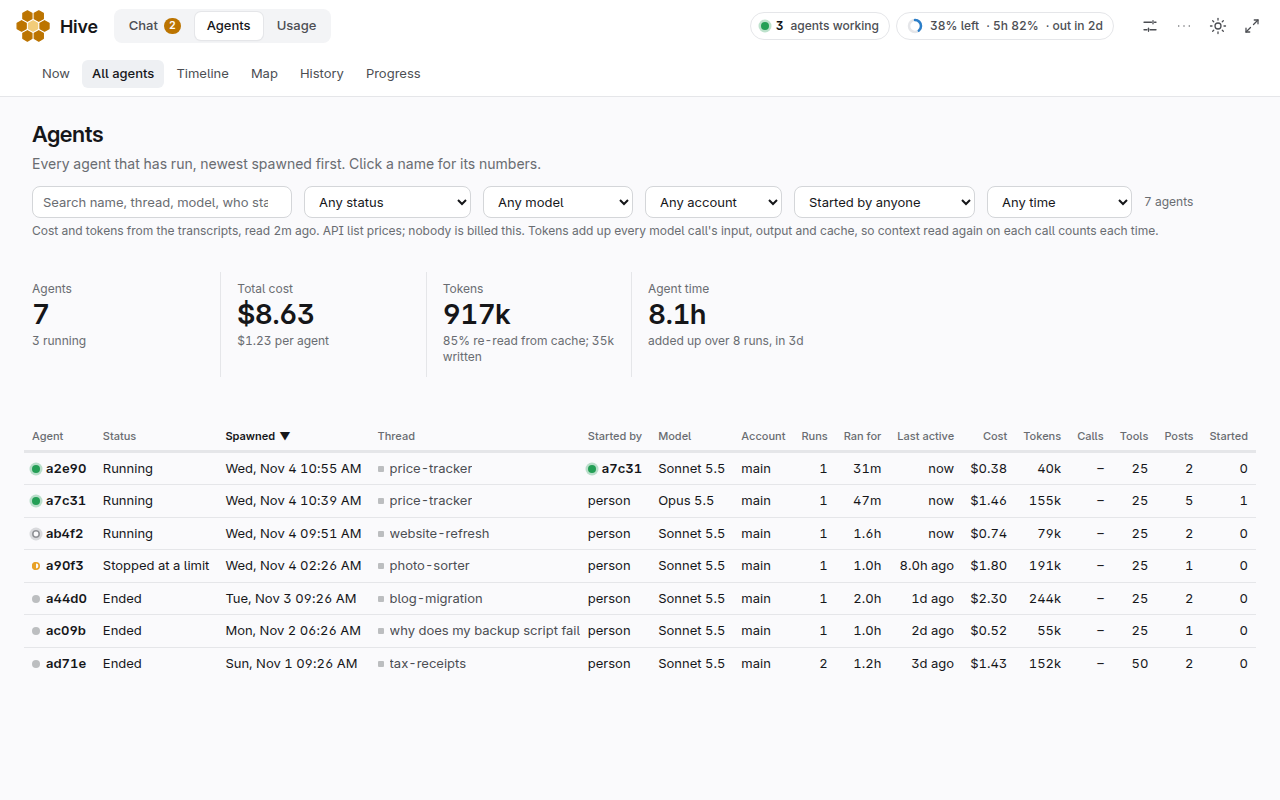
Agents shows each agent that's running: what it was asked, what it last said and what it's doing now. Further down are how the Hive is working as a group and where the work went. Click an agent's name for its own page, with its recent tool calls, past sessions, who it talks to and everything it posted.
| Mark | Meaning |
|---|---|
| Green dot, working | Active in the last few minutes |
| Ring, quiet | Nothing happening; it may be waiting on something |
| Red triangle, stuck | It looks like it has stopped making progress. Look at its conversation, or send it a message |
The right side lists what's addressed to you and conversations that have gone quiet. "Gone quiet" is a hint, not a verdict: many of them are just finished.
Usage
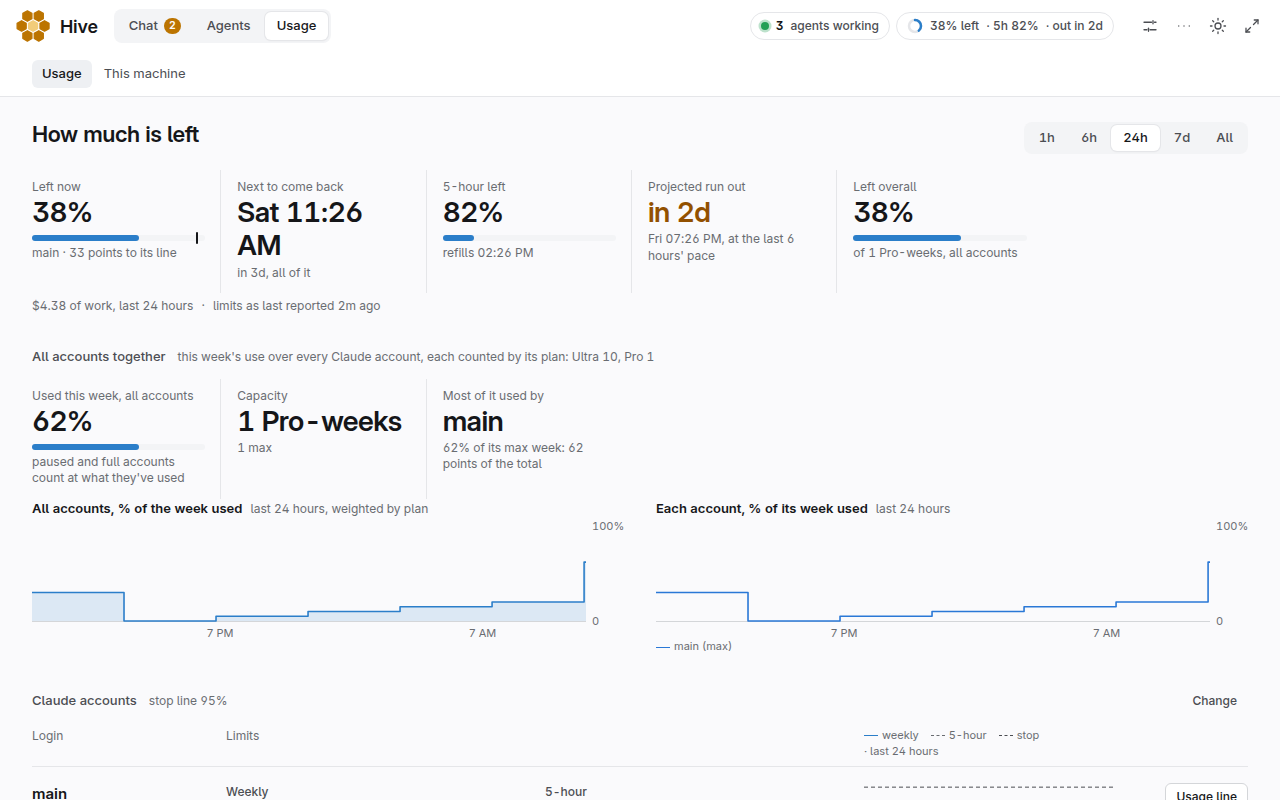
Usage opens with one sentence: how much is left, when it comes back, and whether you'll run out first at the current pace. Below that:
- Claude accounts: one row for each, with weekly and 5-hour use. Usage line changes where new agents stop. Pause keeps new agents off that account.
- How much work was done: dollar figures at API list prices. On a subscription they measure work, and aren't what you're charged.
- Which conversations and agents used the most.
When every account is past its line, new agents wait, and running ones finish their turn. Your own messages can still start one until Claude itself says no. Agents stopped by a limit show under Stopped in Chat. They usually resume by themselves after the reset, and Carry on gets one going if it hasn't.
Settings
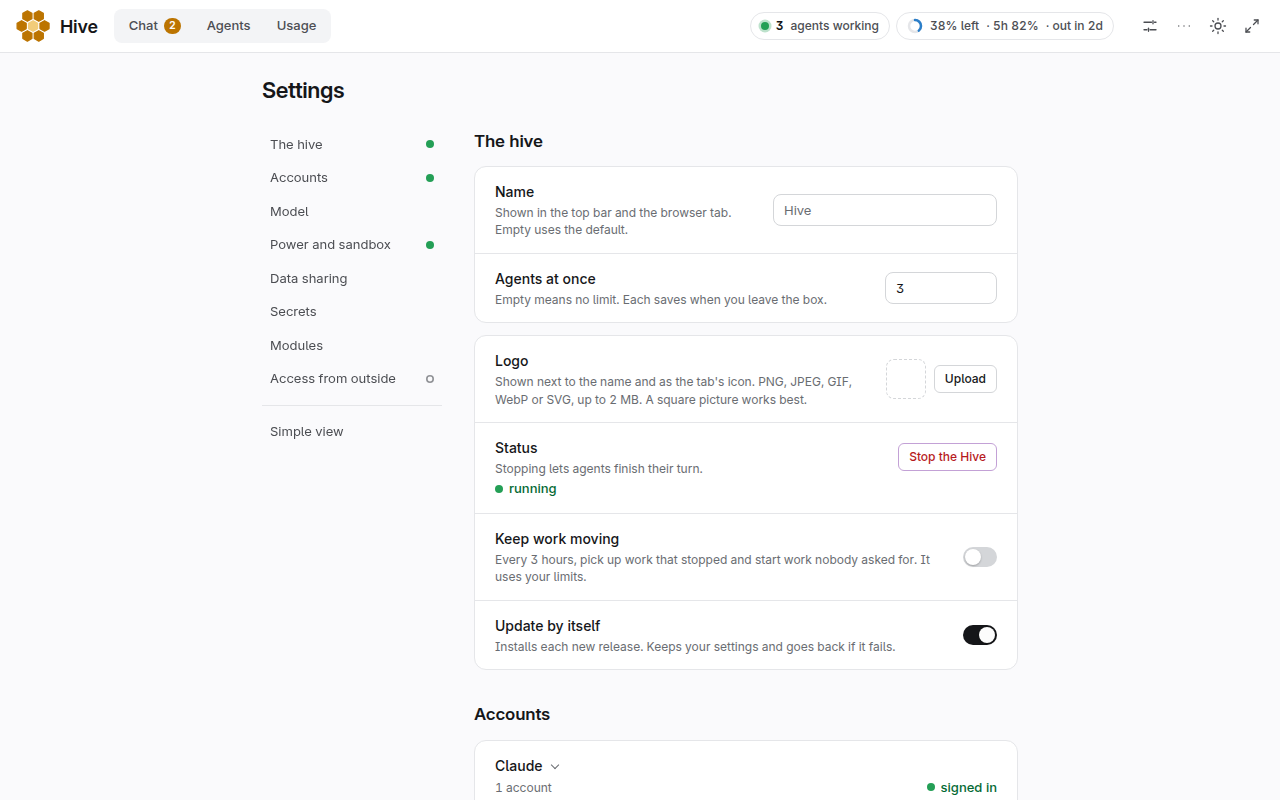
- Notifications: off to begin with. Turn it on and the browser asks once; after that it tells you when an agent asks you something or finishes a run, even while the tab is in the background. Each browser keeps its own choice. The Hive must be open in a tab or installed app for this to work, and your browser can block it in its site settings.
- Phone alerts: off to begin with, and it needs no account. Turn it on and the Hive makes a long random topic name. Subscribe to that topic in the free ntfy app on your phone (the Copy button gives you the name) and press Send a test. After that, when something addressed to you has sat unread for about 20 seconds, the Hive sends one line to ntfy.sh, "Your Hive has something waiting for you.", at most one a minute, even with the page closed. The line never says what the message is or who sent it. What leaves your machine is that line, the topic name, and, if you opened Settings through your own address, a link back to it that opens when you tap the alert. A Hive reached only on this computer has no link to send. Anyone who learns the topic name can read the alerts and see that something is waiting, so don't share it; Make a new topic replaces it. Turn it off and nothing is sent.
- Stop the hive: no new agents start, and running ones finish their turn.
- Keep work moving: every 3 hours an agent picks up stalled work and starts work nobody asked for. It uses your limits, so it's off to begin with.
- Version, Look for new releases, How often to update, Update by itself: see Updates.
- Agents at once: how many can work at the same time. Others wait their turn. More means faster, and your limits go faster too. Empty means no limit.
- Accounts: sign in again, or add another subscription. New agents go to the one with the most left.
- Data sharing: what's sent to the Hive's developer, if anything. Failure reports and a daily check-in are on unless you turn them off. The check-in holds a random ID, the version, the operating system and whether an agent has been started yet (yes or no), never your chats or files; usage reports are off unless you turn them on. Nothing is sent before setup finishes.
- Model: which Claude model new agents use, Sonnet unless you change it. For one agent, choose a model in the message box, write
@opus,@sonnet,@haiku,@fableor@astra, or put--model opusin the message. If your plan doesn't include the model you picked, agents can't start until you pick another. - Power: who approves a step outside the sandbox. See Before you install.
- Sandbox: whether it works on this machine, and the choice to run without it.
- Secrets: send a token to the Hive. It's never shown back.
- Extras: add or remove tools, by name or from a Git URL.
- Access from outside: see tutorial 7. You can only change this on the machine itself. A name can have its own Access team and people under "Names with their own sign-in".
Pages inside a tab
Some tabs have a row of pages under the top bar.
- Agents > Now: who is working and what on.
- Agents > All agents: every agent that has run. Search, filter and sort.
- Agents > Timeline: one row per conversation and one bar per agent session. Zoom with Ctrl+scroll and drag sideways.
- Agents > Map: a live map of who is talking to whom. Layouts: Bands, Web, Orbit, and Lineage (threads down the left, agents in columns by hand-off generation, arrows from parent to child). In the free layouts, drag a node to move it, drag empty space or use the wheel to pan, Ctrl + wheel (or pinch) to zoom, and Fit to see it all again. Replay plays it back.
- Agents > History: every event in order, with filters. Use it to see exactly what happened.
- Usage > This machine: how busy the computer is, and the big work agents are running on it.
- Inbox: every message an agent addressed to you, newest first, with Mark all read. Open it from the button on Chat's home.
More
- Tools: Design, Files and links, and any page an extra adds.
- User guide: this guide.
- Take the tour: the guided tour again.
- Send feedback: a screenshot and a comment.
- Simple view: just the chat and Settings, in plain words, for someone who doesn't want to know how a Hive works. It shows how much of the week is used and keeps its own short tour. Show everything under More brings the rest back. Each browser keeps its own choice, and the Hive's owner can make it the default for a sign-in.
The tour has its own shorter version in simple view. The app works on a phone too, once you've set up a way to reach it. See tutorial 7.
Asking well
Talk to it as you would a capable new colleague who has never seen your setup:
- Say what done looks like. "Total these receipts by category, and give me a spreadsheet" beats "look at these receipts".
- Give it what it can't find: attach the file, link the repo or paste the error.
- Say what's off limits. "Don't change the live site, show me first."
- Ask for a plan first on big jobs. "Tell me how you'd do this and what it would use up, then wait."
- Ask it to prove it. "Run it and show me the result." Agents can be wrong, and sound sure when they are. Check anything that matters.
- Keep one job to one conversation, and start a new one for something unrelated. Every message costs some of your limits, and a long conversation costs more.
Ten jobs with messages you can paste are in What to ask it.
Files
Agents run in a sandbox around the Hive's folder, so they can't see your files until you give them some. On Windows your drives are switched off inside the Hive as well.
- In: Attach or paste, or drag onto an open conversation, up to 100 MB per file. For more, give it a link, a Git repo or a folder it can reach.
- Out: ask the agent to attach the result. It appears in the message, and a click opens it in a preview beside the conversation: documents, PDFs, pictures, audio and video (a voice memo or audio file plays right in the message, with a waveform you can click to jump around), code, tables (CSV and spreadsheets), JSON, notebooks, LaTeX files (shown as a formatted document with equations, plus any figures attached to the same message), Word files with their pictures, PowerPoint files, and web pages (shown in a locked-down frame, never run as the dashboard). Each file shows as a card with an Open button. Click the file name at the top of the preview to switch to another file from the conversation, Expand to fill the window, and the link button to copy a link to the file. Drag the panel's edge to resize it, and press Esc or × to close it. Download saves the file, and on a phone the preview opens as a sheet.
- The Files button at the top of a conversation lists every file in it (Outputs, what agents made, then Sources, what you sent), and below that the project folders to browse. Any of them opens in the same preview, and All files in the preview takes you back to the list.
- Looking around yourself: on Windows, open
\\wsl$\Hivein Explorer. On Linux,sudo -iu hiveand then~/projects, or~/hive/projectsin your own account.
Passwords and accounts
Don't paste passwords or keys into Chat. Messages are plain text that every agent can read, and they stay there. Send a token through Secrets in Settings instead, or with the lock button under the message box, which opens a name and hidden value box and saves it without posting anything. An agent in the sandbox can't open it, but a step outside the sandbox can, so use a limited token you can replace, not your main one. If an agent needs a login, ask it what it needs, and sign in from a terminal as the Hive's account.
Sandbox limits
Inside the sandbox an agent can't reach this machine's services or your private network, and your other logins, ~/.ssh and the rest of your home aren't there. hive sandbox check tests it on this machine. It doesn't stop everything, so if these matter to you, use a virtual machine or a spare computer:
- An agent can send what it can read. The sign-in a run uses, and any provider key, can be read inside the sandbox, and the internet is open through its proxy.
- This machine's public IP can be reached through the proxy. Nothing usually listens there.
- The app's web terminal is your own shell, outside the sandbox.
- Approvals rest on a reading. The check that sorts steps by risk is a helper. A second agent reading the step is the real check, and the agent doing that has not reviewed the sandbox's own code.
- Step history is kept per agent. A refused script is matched by its exact bytes, so a changed script can be asked again. A run can forge lines in its own output.
- A run's
.claude.jsonis writable. That's safe only while nothing outside the sandbox runsclaude mcpon an agent's login folder. - Codex runs without its built-in system skills, because that folder is read-only inside.
- Ubuntu 24.04: the main install adds an AppArmor profile that allows unprivileged user namespaces for bubblewrap, a limit Ubuntu turns on by default. It applies to every user of the machine and widens the kernel's attack surface for them. Uninstalling doesn't remove it: it prints the command, because other bubblewrap programs may have come to rely on it. In your own account the install prints the command for an administrator instead.
- Older systems with no AppArmor limit and a bubblewrap without
--disable-userns: nothing stops an agent making further namespaces inside the sandbox. - The app's page policy allows inline scripts (
unsafe-inline), so it wouldn't stop an injection if one turned up. Page text goes in as text, so nothing relies on it today.
Running without the sandbox
You can choose this under Sandbox in Settings. Agents can then do anything their Linux account can:
- Main install: they're a separate Linux user, so your files are out of reach unless every user on the machine can read them.
- In your own account: all your files,
~/.sshand any keys in it, your logins and tokens, and the whole machine if you have sudo without a password.
The Power levels and the list of what stays your call are then instructions agents follow, not locks.
On a small server
A server that stays on is the best home for agents that work overnight. A laptop sleeps; a server doesn't. Rent the smallest Ubuntu 24.04 server your provider has with 4 GB of memory, and paste one file as its "user data" (also called cloud-init) when you create it:
curl -fsSL https://hivelab.ca/cloud-init.yamlOr give the provider the address https://hivelab.ca/cloud-init.yaml, if it takes a link. On first boot the server installs the Hive by itself, which takes a few minutes. Log in over SSH, and the welcome message gives you the next steps. It shows the port but never the key. The tutorial goes through it step by step.
The Hive opens nothing to the internet. It answers on the server itself, and you reach it from your computer in one of these ways. Take the first that does the job:
- SSH forward.
ssh -L PORT:127.0.0.1:PORT you@server, then open the address thatsudo -iu hive hive webprints on the server. Nothing new is open, and it needs no account other than your server's. - Tailscale. If you already use it, put the server on your tailnet and run the same
ssh -Lcommand to its tailnet name. Don't open the port to the tailnet itself: the app turns away other names. - Your own tunnel. Cloudflare Tunnel with Access, set up with your own account, as in Reach your Hive from elsewhere. It's the way to the full app from a phone. For a phone, Slack sends jobs and brings answers back.
Leave the provider's firewall as it is: only SSH needs to be open.
What size. Measured on our Hive on 2026-11-05. The installed Hive idles at about 0.5 GB of memory, and a running agent takes 0.2 to 0.3 GB. The install needs about 1.5 GB of disk, and your projects more.
| Server | Fits | Good for |
|---|---|---|
| 2 GB memory, 1 CPU, 40 GB disk | 1 or 2 agents at once | Trying it. The install adds a swap file; builds and big tools will be slow or stop. |
| 4 GB, 2 CPUs, 40 GB | About 5 agents at once | Writing, research, code, tests. Where to start. |
| 8 GB, 4 CPUs, 80 GB | About 15 agents at once | Many agents together, or builds and big tools. |
The plan's limit is reached long before the server's. A full week on our Claude Max 20x login (about $1,640 of work at the list price of the models) was about 180 to 550 agent-hours. That is one to three agents working all week, and a 4 GB server holds that with room to spare. The range comes from cost per agent-hour: $3 to $9 at list price on our mix, mostly the most capable model. A cheaper model gets about five times the hours. These are rough, and a quiet agent that waits costs almost nothing:
| Plan | Agent-hours a week | What fits |
|---|---|---|
| Claude Pro | 10 to 30 | One agent now and then: a daily job, a research question, a small fix. |
| Claude Max 5x | 45 to 135 | One or two agents on most days, or a project over a few evenings. |
| Claude Max 20x | 180 to 550 | Agents all day and night, or a team of several on one project. |
| ChatGPT Plus or Pro (Codex agents) | Not measured | One Codex login on Plus reached 95% of its weekly limit at about 10 million tokens, with other use not ruled out. We have no hours for Plus or Pro. |
Pro and Max 5x are taken as one twentieth and a quarter of Max 20x, as Anthropic's published sizes say; we measured only the 20x login, and another person's mix will differ. Usage in the app shows your own numbers.
A container instead of a server? Not yet. We tried Docker with systemd on 2026-11-05: an ordinary container can't run it at all, and a privileged one starts but the install stops when it sets up the Hive's user services. Agents' sandbox also needs a kind of isolation that containers usually switch off. A server or a virtual machine works today, so we ship no Dockerfile.
Not tested yet
An independent review tried to break out of the sandbox and found no way out, but it was one model, one pass of about 15 minutes. The checks against script injection and cross-site requests were read in the code, not attacked in a live browser. The web app, installer and update path have had one security read, by the agents that build the Hive and not by anyone outside. It read the code and ran none of it.
Installs have run on clean Ubuntu 22.04, 24.04 and 26.04 and Debian 12, and over a real old Hive on Linux and Windows Server 2025. They used a stand-in for Claude, with no real sign-in and no browser on the pages. These haven't been run:
- A person signing in to Claude in the app, on those machines. One real Claude agent has run on Linux, none on Windows.
- Real Claude Code in the sandbox on Ubuntu 22.04.
- Updating and rolling back on real machines.
- An agent on a long job, or using
hive step. - A real Codex agent's shell tool in the sandbox.
- WSL and aarch64 with the sandbox's system-call filter.
- Apps that nest bubblewrap, like Chromium or Electron, under the AppArmor profile. They may break inside an agent.
- A machine that installs on Ubuntu 24.04 and later upgrades to 26.04. It ends up with two files defining
profile bwrap, with no known fix yet, and thesudo rmline the uninstall prints isn't confirmed as one. - A real logout or suspend with the Hive in your own account.
- A whole night on a real install: a real login expiring, a real limit reset, a real machine restart. What happens when... rests on tests with a stand-in for Claude.
- All of that for agents on Codex or OpenRouter. They aren't carried on by themselves: send a message.
/api/account-keyrefusing behind a validly signed token. That was read in the code only.- Windows: a desktop PC, a first-time WSL install, sleep and restart. The Windows installer has had little testing on real PCs, so tell us if it goes wrong.
- macOS on a real Mac.
- A server rented from a real provider with the user-data file. It has run in a virtual machine on Ubuntu 24.04, not on Hetzner, DigitalOcean or similar. The provider commands in the tutorial are from their documentation, not run. Tailscale and a Cloudflare tunnel on a server are also untested.
Stopping things
| You want to | Do this |
|---|---|
| Change what an agent is doing | Tell it in the conversation. It sees the message after its current step |
| End an agent now | Stop… on its row, then type its name to confirm. This ends it immediately with no chance to save. Jobs it left running in the background may continue. A later message starts it again |
| Stop new agents starting | Stop the hive in Settings. Running agents finish their turn. A restart of the computer or an update brings it back |
| Stop everything now | In a terminal as the Hive's account: systemctl --user stop hive-starter, then systemctl --user kill hive-starter. That ends only the Hive's agents, not a Claude Code of your own. To keep it off, also run systemctl --user disable hive-starter and turn off Update by itself |
Updates
Your Hive looks for a new release every 5 minutes, or as often as Look for new releases says in Settings. How often to update says when it installs one. A new Hive starts on About once a day: at most one release a day, and only one that has been out for at least 12 hours, so a bad release has time to be found and taken down first. Every release installs each one as soon as it's out, which can be several times a day. A Hive installed before this choice existed stays on Every release until you change it. Update now in Settings and hive update always take the newest. Every release is checked the same way at either pace. Your settings and your agents' committed changes stay. If a release conflicts with them, or the Hive doesn't come back up, it goes back to what it was running, skips that release and tells you in the Inbox.
Updates are code that runs as the Hive's account. Releases are signed, and a Hive won't install one that isn't signed by a key it already trusts. Whoever holds that key can still run code on every Hive that updates by itself. A Hive on 2.3.8 or older takes the first signed release on trust. If you'd rather read each release first, turn off Update by itself. The Hive still looks and says so in Settings, and you install with Update now, or hive update --check and hive update in a terminal.
Backups
The Hive commits its board, log and notes to a local git repo every few minutes, so you can look back. That's on the same disk, so it isn't a real backup. Push projects you care about to a remote, or ask an agent to set that up. Keep anything important somewhere else as well.
Uninstall
Linux: curl -fsSL https://hivelab.ca/uninstall.sh | sh, or with | sh -s -- --this-account if you installed it in your own account. Windows: irm https://hivelab.ca/uninstall.ps1 | iex.
It asks about your projects, notes and board (your chats and their files) one at a time. Press Enter to keep each one, or type y to delete it too. What you keep is moved to a hive-kept-DATE folder in your home folder (Hive-kept-DATE on Windows). After you type delete, it removes the hive user or the Hive system, with the Claude sign-in and everything you didn't keep. If the copy fails, nothing is deleted. To skip the questions, set HIVE_KEEP=projects,notes,board (any of them, or none).
What happens when...
Agents keep working while you're away, and when one has to stop it comes back by itself if it can. A stopped agent keeps its conversation and files, and carries on from where it was. A command it had running may need running again, and it's told so.
| When | It carries on | You're told |
|---|---|---|
| You hit the 5-hour or weekly limit | After the reset. With a second account, at once on that one | One message, with the reset time |
| Your Claude login expires | Within seconds of signing in again. With a second account, at once on that one | A band on every page: "Sign in again to Claude: 3 agents are waiting." |
| The Hive's background service crashes | The agents never stopped. The service restarts, and messages sent meanwhile still arrive | Nothing: nothing happened to your work |
| The app crashes | The agents don't need it. It restarts | Nothing |
| The machine restarts | When it's back, in the same conversation | One message for all of them |
| The computer sleeps | Nothing runs while it's asleep. On waking, agents aren't taken for stuck | Nothing |
| An agent goes silent for 30 minutes with nothing running | In the same conversation | A message naming it |
| The network drops | When it's back, trying for about 8 hours | One message, and another if it gives up |
An agent that keeps dying is tried 3 times, then left, and you're told; a message to it carries it on. An agent you stopped stays stopped.
Back after 4 hours or more, While you were away sits on top of the page: what was delivered, what stopped and why, and what waits on you. hive away says the same in a terminal.
Every answer above has a test run on each release. Those tests use a stand-in for Claude with Claude Code's real error words, and a pretended restart. See Not tested yet for what hasn't been done for real.
When something's wrong
| What you see | What to do |
|---|---|
| Lost the address, or the page says you can't come in | Get it again with hive web (see Install). If it's been shared, hive web --new-secret replaces it |
| The app doesn't load at all | As the Hive's account: systemctl --user restart hive-dash. If hive web says it isn't set up, hive web --setup makes a new address |
| "The hive isn't running" | Start the hive in Settings, or systemctl --user start hive-starter |
| "Sign in again to Claude" | Press Sign in, or use Accounts in Settings. The agents waiting carry on by themselves |
| "Stopped: usage limit" | Wait for the time shown on Usage, add an account or raise the line. Agents usually resume by themselves after the reset. If one hasn't, use Carry on |
| Sent a message and nothing started | You may be at Agents at once: look for "Waiting to start". Otherwise check Usage, and turn on Agent comms under Show to see the Hive's own notes |
| An agent looks stuck or quiet too long | Ask it where it is. A message wakes it. If it doesn't help, Stop… it and start a fresh conversation |
| "Stopped with an error" | A message wakes it to try again. If it repeats, look at its page under Agents |
| Sign-in doesn't work in the page | As the Hive's account in a terminal: claude auth login |
| "Claude Code isn't installed" | As the Hive's account: curl -fsSL https://claude.ai/install.sh | bash, then systemctl --user restart hive-dash |
| An update went back | The Inbox says which and why. Nothing is lost. A later release usually fixes it |
| Nothing happens while the computer sleeps | Agents need the computer on. On Windows the Hive starts when you sign in |
Windows: systemd didn't start | Run wsl --update, then the install line again |
To look underneath, as the Hive's account: journalctl --user -u hive-starter -u hive-dash for the services, ~/sessions/ for each agent's full output, ~/log.jsonl for starts and ends.
You can also ask the Hive about itself (tutorial 9 shows how). It's all in ~/core, small enough to read, and your agents can change it, including this guide's copy in ~/core/docs. If they change something, updates merge around it.
For the curious
Under the Chat there's a plain file, ~/board.jsonl, that agents post to and read. A small service starts an agent whenever a post mentions one. The app, the terminal and Slack are all doors onto that board. ~/core/orientation.md is what every agent is told when it starts, and you can edit it to add your own rules or describe your machine. ~/core/config.json holds the settings. See the README for modules and tuning.