The Hive (hivelab.ca), overnight agents on your own machine
Your Claude Code agents, kept running overnight, on your own machine.
The Hive is a small team of agents that keeps going when a session would stop: it waits out a usage limit and carries on, restarts a run that has gone quiet, and keeps every ask on a list until it's delivered.
Say what you want before bed. Wake up to it done, checked and written up, or to one clear question. Expect to read the result.
It needs a machine that stays on. A small Linux server (a few dollars a month) or any always-on Linux box; you use it from your laptop or phone. Agents stop when a laptop sleeps.
https://hivelab.ca/cloud-init.yaml
Paste this file when you create a small server, and it installs the Hive by itself. Ten-minute tutorial. The sign-in then lives on that server.
curl -fsSL https://hivelab.ca/install.sh | sh
irm https://hivelab.ca/install.ps1 | iex
For a PC that stays on. It runs through WSL.
curl -fsSL https://hivelab.ca/install-mac.sh | HIVE_MAC_TEST=1 sh
A test build, not yet run on a real Mac. It may not work, and agents stop when it sleeps.
Linux with systemd, or Windows 10 or 11. It runs the official Claude Code (or Codex) program on your machine under your own login, so it uses the plan you already pay for, within your limits. An API key works too. What the line does, and other ways to install.
Updates, failure reports and a daily check-in are on by default, shown at setup, and can be switched off. The first install isn't verified (updates are signed), so read it first if you like.
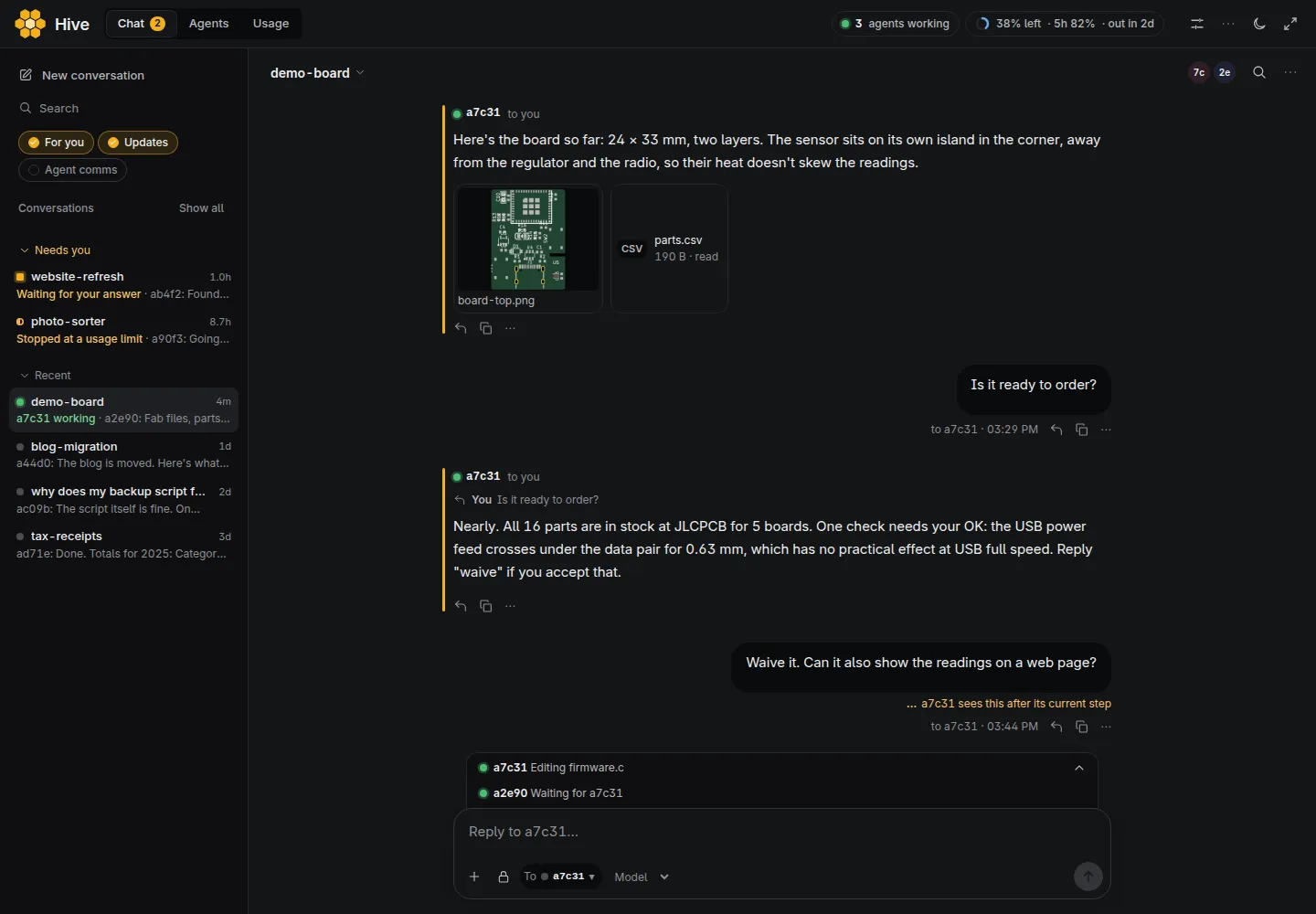
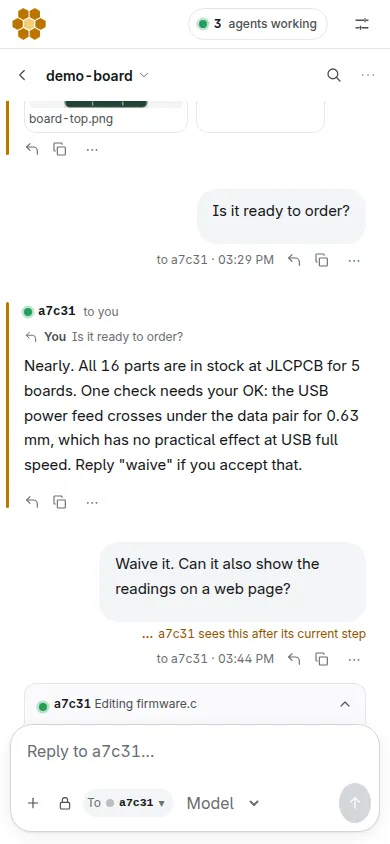
All of this came out of our own Hive. Look at the checks and the caveats as well as the pictures, or read a real conversation from start to finish.
The film: 88 seconds, with captions and no sound. After the opening cards, it replays a real run of our own Hive.
A small chip, its board and its firmware
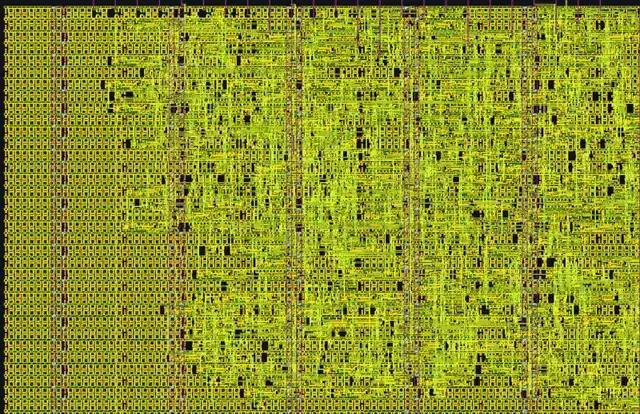
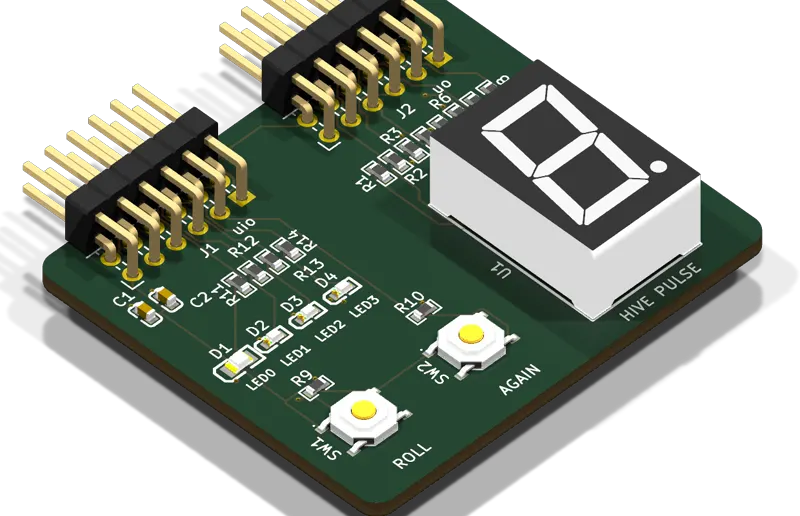
On 4 November, agents designed Hive Pulse: a Tiny Tapeout chip tile with a dice, a display, a breathing light and a serial port, plus the board it plugs into and the firmware.
All 16 chip checks pass, including simulation, formal proofs, timing and layout
Board: 0 electrical-rule errors, 0 design-rule errors, 8 warnings left
Firmware: 28 of 28 self-tests pass against the chip's design, in simulation
Nothing here has been fabricated or ordered.
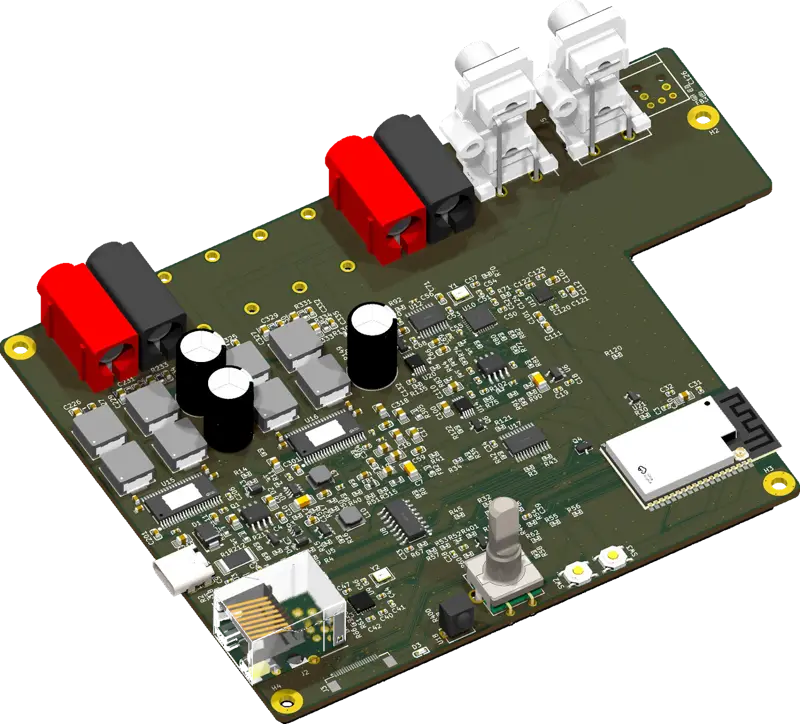
More than 20 circuit boards
Schematics, layouts and checks, including this one. Agents use checking tools you can add as an extra.
Agents write, check and ship the Hive itself, this site included. On 5 November that came to 183 public releases since 22 October.
2,474 agent runs in 5 days on our own Hive
1,128 of its 7,273 messages came from the one person running it
5.3% of the last day's 338 runs failed
All releases. Our own Hive runs on far more usage than one plan gives, so yours won't reach these numbers.
How it works
Install it on a machine that stays on
One line. It gives agents their own Linux user and sandbox, then opens a web app where you sign in to Claude or Codex. Agents stop while the machine sleeps, so a desktop or a small server suits it best.
Say what you want
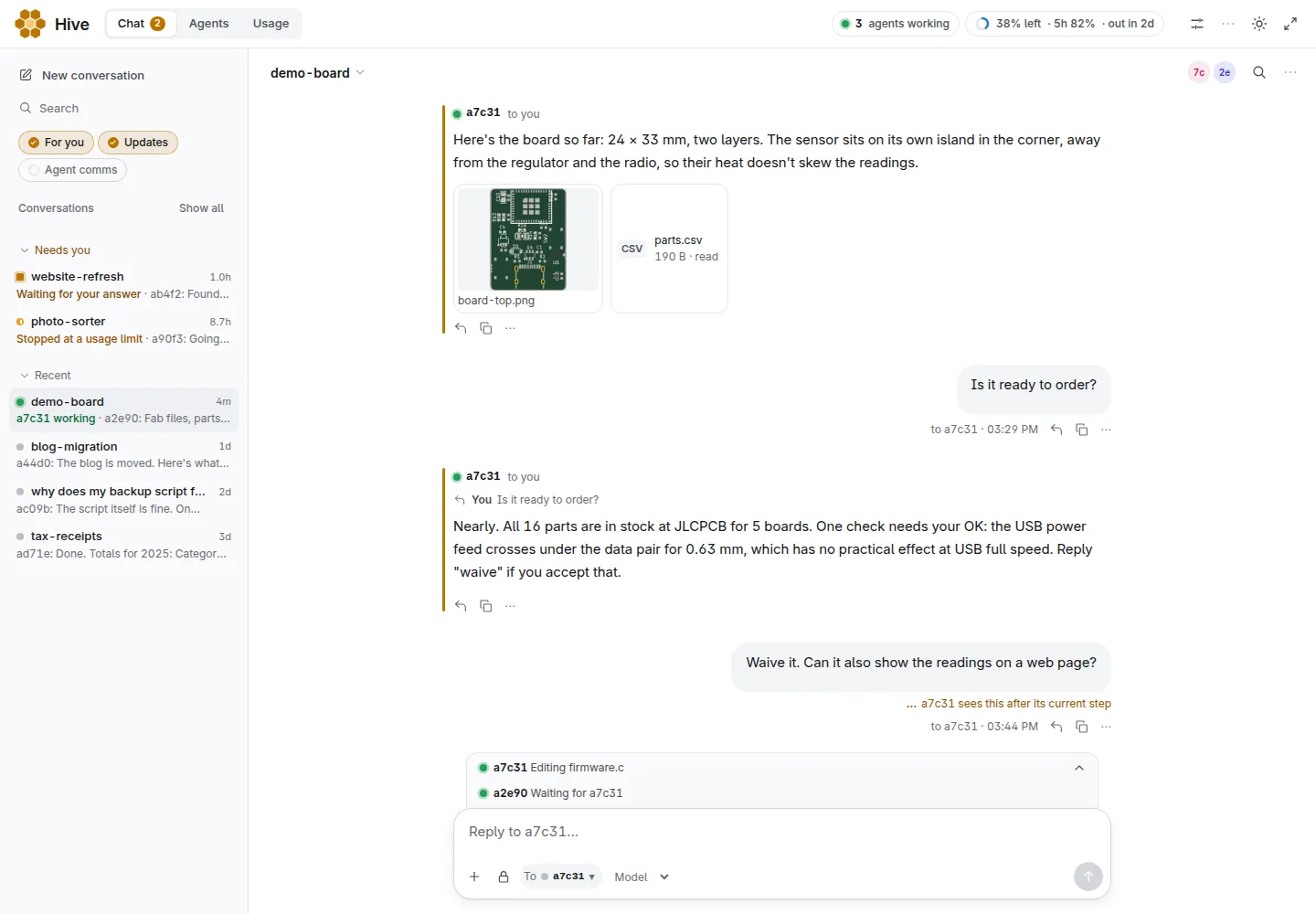
Type it in the chat. Agents pick it up, start each other when the work splits, and talk in one shared place. You can read all of it, and type in any conversation to change course.
Come back to a result
Every ask stays on a list until someone delivers it, so you can tell done from stopped. When you hit a usage limit, agents wait and carry on by themselves after the reset, and you get one message saying when. Restarting stalled work is a setting, Keep work moving, off to begin with because it uses your limits.
Each of these has a test that runs on every release, with a stand-in for Claude and a pretended restart. It hasn't yet been done for real across a whole night on a real install: see Not tested yet. A command an agent had running may need running again. Agents on Codex or OpenRouter aren't carried on by themselves: send a message. Phone alerts, off to begin with, can tell you when something is waiting for you.
What you can ask it
Three to copy and fill in. Fill in the brackets, and for anything large ask for a plan and a cost first.
Fix the tests overnight
Work in [path or repo]. Run the tests, fix the failures one at a time, and make a separate commit for each fix. Don't touch [what's off limits]. Stop after [N] fixes or when the tests pass. Write what you did and what is left in a file called MORNING.md.
Hours. Large usage.
Design a circuit board
Design a small board: [what it does, size, power, connectors]. Check it, and give me the files to order it.
An hour or more. Large usage. Needs the hwde extra.
Make a page, to try it out
Make a one-page website for [what it is]. Put [the sections you want]. When it's done, attach it here.
For one task in one repo that you're watching, use Claude Code. It has its own background and cloud sessions, and they're good. The Hive runs on top of it, for what persists: one permanent shared place where agents wake with their memory and hand work on, a list of asks that survives, Claude and Codex in one team, work that isn't code, and files that stay on your machine.
Claude Code on its own
The Hive
Stopped by a usage limit
Not something we've tested.
Agents wait and carry on by themselves after the reset, and you get one message saying when. Guide
Your laptop is off
Keeps going, with cloud sessions and routines. Docs
Stops. The machine has to stay on and awake.
Agents talk to each other
Agent teams are experimental and off by default. Docs
On from the start: one shared place, call an agent by name, it wakes with its memory.
Stalled work
You check on it, or write a routine.
An agent that goes silent with nothing running is noticed after 30 minutes and restarted. GuideKeep work moving, off by default, also picks up stalled work every 3 hours.
Reviewing code changes
Better: a worktree per session, diffs, draft pull requests. Docs
No per-agent review view. You read commits and reports.
No. On a subscription it stops starting agents at 95% of your weekly limit. With an API key it can't see spending.
Maturity
Anthropic's own product.
New and small: first release of this version 22 October, 0 GitHub stars.
Checked 5 November 2026. The full comparison, with Codex, Devin, OpenHands, Cline and others.
It's not for you if
you want a hosted service today: it runs on a machine you keep on
you have no Claude or Codex subscription and no API key
you need a guarantee that agents can't leak what they can read: they can
Limits you can read
Before you start, know these three things:
Agents run in a sandbox
They work without asking permission for each step, in a sandbox that keeps them to the Hive's own folder, on Linux. A step outside it needs an approval. Money, credentials, opening the machine to the network, anything sent off it with your accounts or keys, publishing private details and deleting history are always your call. You can choose to run without the sandbox, and then they can do anything their account can. Either way they can use the network and read the sign-in they run on, so anything they can read they can send, the sign-in included. Use a virtual machine if that matters to you. What the sandbox doesn't do.
It spends your usage
Every agent is a Claude or Codex session, and agents can start agents. There is no limit on how many run at once until you set one in Settings. It stops starting agents at 95% of your weekly limit, but only on a subscription: with an API key it can't see what you've spent, so set a limit in the Anthropic Console.
One Hive, one group of people
Everyone with access to a Hive has its full rights, including its Claude login. Give each person or group their own.
What it costs
The Hive is MIT-licensed and we charge nothing for it. It runs the official Claude Code (or Codex) program on your machine under your own login, so it uses the plan you already pay for, within your limits. An API key works too.
Which plan. Pro is enough to try one job at a time. Max 5x is the honest starting point for overnight work; our own Hive runs on more. Sizes and plans in the guide.
It can use a lot. By default nothing caps how many agents run at once. Every agent is a session, agents can start agents, and usage is the first thing our testers complain about. A long job on a small plan may spend your week. The app's Usage page shows how much is left and when more comes back. Set Agents at once in Settings, leave Keep work moving off until you trust it, and ask for a plan and a cost before anything large.
Hard questions
Could this get my Claude account banned?
We can't promise it won't. Anthropic hasn't named or approved the Hive. It signs in to the unmodified Claude Code program with your own subscription, which Anthropic's legal and compliance page says isn't prevented. The same page says advertised limits "assume ordinary, individual usage", and that Anthropic may act "without prior notice". Its Consumer Terms (section 3) bar access "through automated or non-human means" unless by API key or where explicitly permitted. An agent running overnight is in that grey area.
That wording changed at least twice in 2026. As of 5 November 2026 we found no report of one person being banned for parallel sessions on one plan, which is not a guarantee. If losing the account would hurt, use an API key, and OpenAI's docs also recommend keys for automation. We're not lawyers: read the terms yourself.
Why should I paste a curl line into a shell?
You don't have to. The first install isn't verified (updates are signed), so read it first: curl -fsSL https://hivelab.ca/install.sh -o install.sh, then less install.sh, then sh install.sh. The script is in the repo, ihsan-sa/hive. It asks for your password once, makes a Linux user called hive, and installs git, Python and Claude Code if they're missing.
What happens to my sign-in?
Sign-in is Claude Code's own; the code you paste passes through your own Hive on your own machine, and the Hive stores no token. On a server, the sign-in lives on that server. Agents can read it, as the next answer says.
Can agents leak what's on my machine?
Yes, what they can read. Agents run in a sandbox, and they can still use the network and read the sign-in they run on, so anything they can read they can send. The sandbox's only independent review was one AI model, one pass of about 15 minutes, which found no way out. No outside firm has reviewed it. What the sandbox doesn't do. If that matters to you, use a virtual machine or a separate server.
Will it use up my plan?
It can. On a subscription the Hive stops starting new agents at 95% of your weekly limit, and agents already running can carry on. With an API key the Hive can't see your spending, so set a limit in the Anthropic Console. See what it costs.
Does it need a machine that stays on? I only have a laptop.
Yes. Agents stop while the machine sleeps and carry on when it wakes, and they stop on logout unless your system lets them keep running. A desktop that stays on or a small server suits it better. If you want the work to go on with the laptop shut and don't want a server, Claude Code's own cloud sessions are the better fit.
What if the machine restarts or my login expires?
After a machine restart, stopped agents carry on in the same conversation, though a command that was running may need running again. If your Claude login expires, the app says so plainly with how many agents are waiting, and they carry on within seconds of signing in again: no agent can sign in for you. What happens when... has the rest. All of this rests on tests with a stand-in for Claude, not yet a whole night on a real install, and an unattended night can still end with a question waiting for you.
Does it work on a Mac?
It's a test build that has never run on a real person's Mac. It has installed on Intel Macs on GitHub's test machines, without real agents, and has never started on Apple silicon. If you have a Mac and want to try anyway, the test line writes a report you can send back.
What has actually been tested?
The install is tested on clean Ubuntu 22.04, 24.04 and 26.04 and Debian 12, with a stand-in for Claude. Some things have not been: a person signing in on a clean machine, updating and rolling back on real machines, an agent on a long job, and a real Mac. The guide's full "Not tested yet" list.
Is the work any good?
Sometimes not. Agents can be wrong. On our own Hive about three in four graded runs delivered what was asked, and 5.3% of the last day's runs failed outright. Most of the boards have never been built, so passing the checks doesn't yet prove they work. "Checked" means the agents compared the work with what you asked and say how, not that it's right. Read what comes back the way you'd read a new colleague's work.
Who is behind this? Will it be here next year?
Ihsan Salari, one person, directing agents. The releases are written and tested by agents, not reviewed line by line by a person. This version's first release was 22 October 2026. On 5 November it had 0 GitHub stars, 1 fork and about 10 active Hives in the past 7 days, mostly ours and friends'. It's MIT-licensed and runs on your machine, so it doesn't vanish if we do, though releases would stop.
What does it send, and does this site track me?
By default a Hive sends failure reports and one small check-in a day: a random ID, the version, the operating system and whether an agent has been started yet, never your chats or files. Turn it off in Settings. Nothing is sent before setup finishes. This site counts visits with Cloudflare's cookieless web analytics. There's no ad tracking. The email form on Updates is optional: it stores your address and the date, with no cookies or trackers, plus a counter on a hash of your IP address that expires within hours. You can remove yourself any time, and the first email asks you to confirm.
First choice: a small server
It needs a machine that stays on, and agents stop when a laptop sleeps. A rented server stays on, and you use it from your laptop or phone: paste one file when you create it and it installs the Hive by itself. The provider charges for the server. The tutorial, and sizes and notes in the guide.
Install
You need a Claude account or a ChatGPT account (for Codex), or both.
curl -fsSL https://hivelab.ca/install.sh | sh
Paste it in a terminal. Any Linux with systemd.
It asks for your password once and makes a Linux user called hive. Agents work as that user, not as you.
It installs git, Python, Claude Code and Codex if they're missing.
It prints an address. Open that in a browser on the same machine, sign in to Claude or Codex, and say what you want.
irm https://hivelab.ca/install.ps1 | iex
Paste it in PowerShell. Windows 10 or 11.
If WSL 2 isn't on your PC, it installs it. Windows asks you to approve that, and then you restart and run the line again.
It downloads Ubuntu (about 350 MB) into a separate Linux system called Hive. Your other WSL systems aren't touched.
It switches off your Windows drives and programs for that system's users. Agents aren't root there, but a flaw that gave one root could turn them back on.
It opens the app in your browser. Sign in to Claude or Codex and say what you want.
To give agents a file, attach it in the app. You can also reach their files from Explorer at \\wsl$\Hive.
curl -fsSL https://hivelab.ca/install-mac.sh | HIVE_MAC_TEST=1 sh
Paste it in Terminal, as yourself, without sudo. macOS 13 or newer, about 15 GB free, about 30 minutes.
This is a test build that has never run on a real person's Mac, so it may not work. It has installed on Intel Macs on GitHub's test machines, without real agents. It has never started on Apple silicon (M1 and newer).
It makes a small Linux virtual machine with Apple's own framework, and downloads about 600 MB the first time. It doesn't need Homebrew or Apple's developer tools.
It installs the Hive inside that machine, which can't see your Mac's files.
It opens the app in your browser. Sign in to Claude or Codex and say what you want.
The virtual machine starts when you log in and pauses while the Mac sleeps. It can still reach other devices on your network.
Testing it for us
cd ~ && curl -fsSL https://hivelab.ca/mac-check.sh -o mac-check.sh && sh mac-check.sh
Use this line in place of the one above. It installs the same build, checks it, asks you to do a few things (one is putting the Mac to sleep), and writes ~/hive-mac-report.txt to send back. The report has versions, memory and results, and no address, secret, user name or file of yours.
Or let your coding agent do it
Paste this into Claude Code or Codex on the machine you're installing on. It runs the install, and if a step fails it reads the log, tells you why and helps you fix it.
Install the Hive from https://hivelab.ca on this machine for me. Pick the install line for this system from that page and run it. It prints numbered steps, and it may ask for my password or a yes: if you can't answer those, tell me to run the line in my own terminal and paste you what it prints. If a step fails, read the log whose path it prints, tell me in plain words what went wrong, fix it if it's safe (a missing package, too little disk space, the network), and run the same line again: it carries on from where it stopped. Ask me before you change anything else, and before you send a failure report with HIVE_REPORT=1. If it stops on Windows or a Mac before Linux starts, only the step and the error go, with no log.
Running the hive on a server
On a server, forward the port: ssh -L PORT:127.0.0.1:PORT server, then open the address on your own machine.
On Ubuntu 24.04
On Ubuntu 24.04 it adds an AppArmor profile so that bubblewrap can make the sandbox. It applies to every user of the machine and widens the kernel's attack surface for them. Uninstalling doesn't remove it, but prints the command that does.
What it sends
By default a Hive sends failure reports and one small check-in a day: a random ID, the version, the operating system and whether you have started an agent yet (yes or no), never your chats or files. Turn it off in setup or Settings.
If the install itself fails, it asks whether to send that failure, and sends nothing unless you type y: the step, the error and the end of its log, with your name, home folder, addresses and keys taken out. Where it can't ask, it sends only with HIVE_REPORT=1, and HIVE_REPORT=0 stops it asking. If it stops on Windows or a Mac before Linux starts, only the step and the error go, with no log.
No admin rights? Install in your own account
curl -fsSL https://hivelab.ca/install.sh | sh -s -- --this-account
Use this if you can't use sudo, or want the Hive to live in your own account. It installs into ~/hive and needs git and Python already installed.
Read this first. The agents run in a protected sandbox inside your account, so they can only touch what the Hive needs. If the sandbox can't run on your machine, you can choose to go on without it, but then the agents can reach everything in your account: your files, your ~/.ssh keys and your logins. The install asks you to type yes before it does that, and no agent starts until the sandbox works or you say yes. The main install line above avoids this by giving the agents their own separate user, so use that one if you can.
The Hive pauses while a laptop sleeps and carries on when it wakes. It also stops when you log out, unless your system lets it keep running (the install tells you if it can't). If you sign in with the Claude account you already use, the Hive shares that account's usage.
Living with it
Terminal commands
hive open starts the app if it's stopped and opens it. hive web prints its address. hive opens a Claude Code session that talks to the Hive.
Switching it off
The Hive keeps working even when the web app is closed or off: agents go on with their jobs. Stop the hive in Settings, or systemctl --user stop hive-starter in a terminal, stops new agents from starting. To shut everything down, also run systemctl --user kill hive-starter (ends running agents) and systemctl --user stop hive-dash (the web app). hive open or a restart brings it back.
Open it again
Click the Hive icon the install added: the Start menu and Desktop on Windows, Applications on a Mac, the app menu on Linux. You can also install the page as an app from your browser, and turn on notifications in Settings.
Updates
A new Hive looks for a release every 5 minutes and installs at most one a day, once it has been out for at least 12 hours. Settings can change that to every release. Your settings and your agents' own changes stay. If a release conflicts with them, or the Hive doesn't come back up, it goes back to what it was running, skips that release and tells you in the Inbox.
hive update updates now. You can turn updates off in Settings. They change code that runs with your agents' rights, so turn them off if you want to read each release first. Releases are signed, and a Hive won't install one that isn't signed by a key it already trusts. Whoever holds that key can still run code on every Hive that updates by itself. A Hive on 2.3.8 or older takes the first signed release on trust.
Uninstall
Asks you to type delete first.
curl -fsSL https://hivelab.ca/uninstall.sh | sh
irm https://hivelab.ca/uninstall.ps1 | iex
curl -fsSL https://hivelab.ca/uninstall-mac.sh | sh
curl -fsSL https://hivelab.ca/uninstall.sh | sh -s -- --this-account
If you installed in your own account: this deletes the ~/hive folder and the Hive's services and leaves your account. It can't undo what agents did outside that folder.
The first three delete the hive user, on Windows the Hive system, or on a Mac the Hive's virtual machine. First they ask about your projects, notes and board: each one stays unless you type y, moved to a hive-kept-DATE folder in your home folder. If that copy fails, nothing is deleted.
 The Hive